
In today’s mobile photography era, smartphone cameras have become incredibly powerful. However, even the best cameras sometimes struggle with lighting—especially in high-contrast scenes like sunsets, cityscapes, or indoor shots with bright windows. This is where HDR Photo Apps come in.
HDR (High Dynamic Range) photography allows you to capture more detail in both bright and dark areas of an image. With the help of modern HDR Photo Apps, you can transform ordinary photos into visually stunning masterpieces right from your smartphone.
In this detailed guide, we’ll explore everything you need to know about HDR Photo Apps, including how they work, their benefits, top features, best apps, and tips to get the most out of them.
What Are HDR Photo Apps?
HDR Photo Apps are mobile applications designed to enhance photos by combining multiple exposures into a single image. These apps capture or process photos with different brightness levels and merge them to create a balanced and detailed result.
How HDR Works
When you take a photo using HDR mode, the app captures multiple images:
- One underexposed (dark)
- One correctly exposed
- One overexposed (bright)
The app then blends these images to retain:
- Highlights from bright areas
- Details from shadows
- Balanced midtones
This results in a more dynamic and realistic photo.
Why Use HDR Photo Apps?
HDR Photo Apps are essential tools for anyone who wants to improve their mobile photography. Whether you’re a beginner or a professional, these apps can significantly enhance your images.
Key Benefits of HDR Photo Apps
1. Better Dynamic Range
HDR apps capture a wider range of light and detail, making your photos look more natural and vivid.
2. Enhanced Details
You can see textures and details that would otherwise be lost in shadows or highlights.
3. Improved Low-Light Photography
HDR Photo Apps help brighten dark scenes without overexposing the image.
4. Professional-Looking Results
Even basic photos can look like they were taken with a DSLR camera.
5. Easy Editing Tools
Most HDR Photo Apps come with built-in editing features like filters, contrast control, and color adjustments.
Top Features to Look for in HDR Photo Apps
Not all HDR Photo Apps are the same. When choosing an app, look for these essential features:
1. Automatic HDR Mode
Apps that automatically detect when HDR is needed save time and effort.
2. Manual Control
Advanced users may prefer manual settings for exposure, ISO, and shutter speed.
3. AI Enhancement
Modern HDR Photo Apps use AI to optimize images for better clarity and color balance.
4. Real-Time Preview
Seeing HDR effects before capturing the image helps in framing the perfect shot.
5. Editing Tools
Look for apps that offer:
- Brightness and contrast adjustment
- Saturation control
- Sharpness enhancement
- Filters and presets
Best HDR Photo Apps for Android in 2026
Here are some of the best HDR Photo Apps you can use to take your photography to the next level:
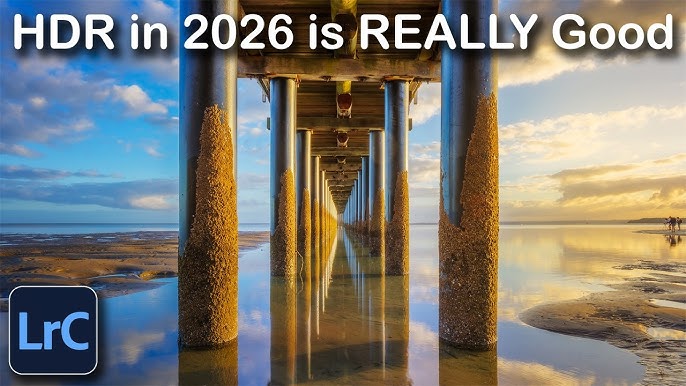
1. Adobe Lightroom
Features:
- Advanced HDR merging
- Professional editing tools
- Cloud syncing
Why It’s Great:
It’s perfect for both beginners and professionals who want complete control over their photos.
2. Snapseed
Features:
- HDR Scape filter
- Easy-to-use interface
- Powerful editing tools
Why It’s Great:
Snapseed offers excellent HDR effects with simple controls, making it ideal for beginners.
3. HDR Camera+
Features:
- Real-time HDR processing
- Natural-looking results
- Fast performance
Why It’s Great:
This app focuses purely on HDR, delivering high-quality images without complexity.
4. Camera FV-5
Features:
- DSLR-like manual controls
- Long exposure support
- RAW format capture
Why It’s Great:
Perfect for advanced users who want full control over HDR photography.
5. Pro HDR Camera
Features:
- Auto alignment
- Ghost removal
- High-quality HDR images
Why It’s Great:
It produces realistic HDR images without over-processing.
How to Use HDR Photo Apps Effectively
Using HDR Photo Apps is simple, but following some best practices can help you get the best results.
1. Choose the Right Scene
HDR works best in:
- Landscapes
- Sunsets and sunrises
- High-contrast environments
- Indoor shots with bright windows
Avoid using HDR for:
- Fast-moving subjects
- Action shots
2. Keep Your Phone Steady
Since HDR combines multiple shots, any movement can cause blur. Use:
- A tripod
- Stable surface
3. Avoid Over-Processing
Too much HDR can make photos look unnatural. Adjust settings carefully to maintain realism.
4. Use Editing Tools Wisely
After capturing, fine-tune your image by adjusting:
- Contrast
- Highlights
- Shadows
- Saturation
HDR vs Non-HDR Photography
Understanding the difference between HDR and standard photography helps you know when to use HDR Photo Apps.
HDR Photography
- Captures multiple exposures
- Better detail in highlights and shadows
- Ideal for complex lighting
Non-HDR Photography
- Single exposure
- Faster capture
- Better for moving subjects
Common Mistakes to Avoid in HDR Photography
Even with the best HDR Photo Apps, mistakes can reduce image quality.
1. Overusing HDR
Too much HDR can make photos look fake or overly processed.
2. Shooting Moving Subjects
HDR may cause ghosting effects if objects are moving.
3. Ignoring Composition
HDR improves quality but doesn’t fix poor framing.
4. Not Using RAW Format
If your app supports RAW, use it for better editing flexibility.
SEO Benefits of Using HDR Photo Apps Content on Your Website
If you’re running a site like Apkw8.org, writing about HDR Photo Apps can bring significant SEO benefits.
1. High Search Demand
Keywords like “HDR Photo Apps” have consistent search volume.
2. Low Competition Opportunities
Long-tail keywords such as:
- Best HDR Photo Apps for Android
- Free HDR Photo Apps 2026
- HDR camera apps download
3. User Engagement
Photography-related content attracts:
- Bloggers
- Creators
- Social media users
4. Monetization Potential
You can monetize through:
- AdSense
- Affiliate links
- App downloads
Tips to Optimize HDR Photo Apps Content for SEO
To rank your article on Google, follow these SEO best practices:
1. Use Keyword Naturally
Include “HDR Photo Apps” in:
- Title
- Headings
- First 100 words
- Conclusion
2. Add Internal Links
Link to related articles like:
- Best camera apps
- Photo editing apps
- AI image tools
3. Optimize Meta Tags
- Title: Include main keyword
- Description: Add engaging summary
4. Use Proper Headings
Structure content with:
- H1 for title
- H2 for sections
- H3 for subtopics
5. Improve Readability
- Short paragraphs
- Bullet points
- Simple language
Future of HDR Photo Apps
The future of HDR Photo Apps looks promising with advancements in AI and computational photography.
1. AI-Powered HDR
Apps will automatically adjust exposure and colors using AI.
2. Real-Time HDR Video
HDR is expanding beyond photos into video recording.
3. Better Low-Light Performance
Night photography will become even more powerful.
4. Integration with Social Media
Direct sharing with enhanced HDR quality.
Conclusion
HDR Photo Apps have completely changed the way we capture and edit images on smartphones. Whether you’re photographing landscapes, portraits, or everyday moments, these apps help you achieve professional-quality results with minimal effort.
By understanding how HDR works and using the right apps and techniques, you can take your photography to the next level. For website owners like Apkw8.org, creating high-quality, SEO-optimized content around HDR Photo Apps can also drive significant traffic and engagement.
Start exploring the best HDR Photo Apps today and transform your photos into stunning visual stories.